
A dental clinic owner in Toronto liked your first call. At the end she asked, “Can you send me your website?” You sent a GitHub profile with six tutorial projects, no prices and no contact form. She never replied. Your code was fine. The problem was that nothing on the page told her what you would build for her, roughly what it would cost or how to start.
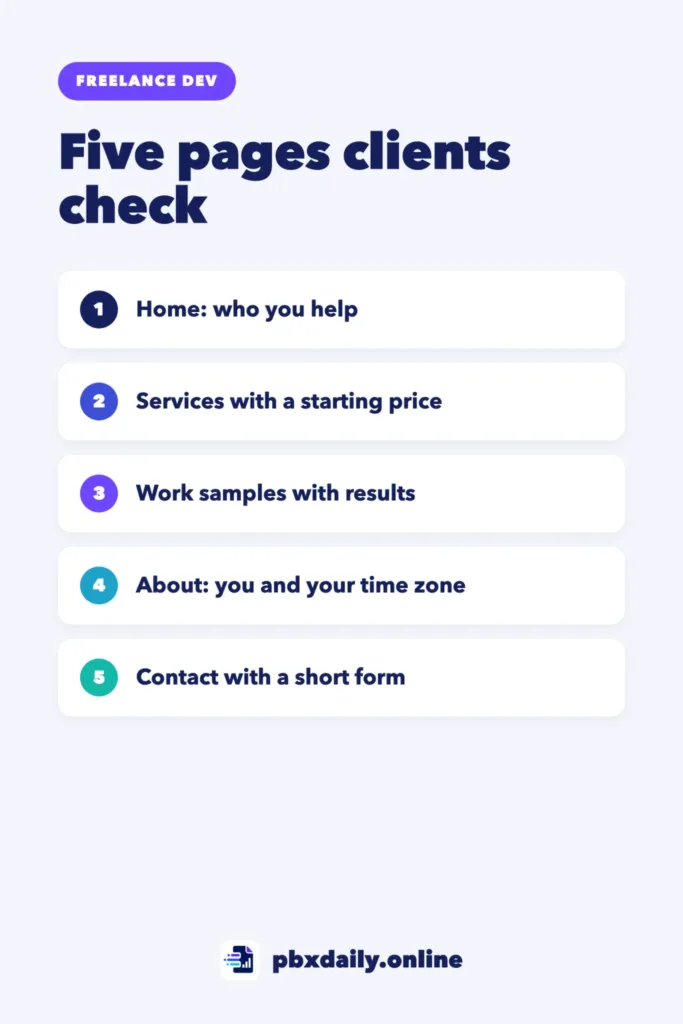
This guide shows you how to build a freelance website that answers those three questions. It covers the five pages clients check, what to write on each one, where you can host a site that sells your services, the SEO basics to set up and the mistakes that make visitors leave. For a developer, there is a bonus: the site itself becomes one of your work samples.
Freelance Website vs Job Portfolio: What Changes
A job portfolio is read by a recruiter who wants to know if you can do the job. A freelance website is read by a business owner with a problem and a budget. The projects can be the same, but what you say about them changes. For job applications, see our guide to the beginner developer portfolio.
Step 1: Write Your Offer in One Line
Every page depends on one sentence that says who you help and what you do for them. Use this formula: “I build [type of website] for [type of business] so they can [result].” For example: “I build booking websites for small dental clinics so patients can book without calling.”
“I build websites” is too broad to say yes to. If you haven’t chosen a niche yet, our guide on how to get your first freelance web development client shows how to pick one.
Step 2: Page 1, a Home Page That Says Who You Help
Visitors decide on the first screen whether to keep reading. Put three things there:



- Your offer line as the main heading.
- One piece of proof, such as a short testimonial or a sample with one line about the result.
- One button, such as “Tell me about your project,” that opens your contact page.
Below that, add short sections that link to your services, work and About page. Skip the long list of technologies. A clinic owner doesn’t search for “React”; she wants easier bookings.
Step 3: Page 2, Services With a Starting Price
Offer two or three packages, not a long menu. For each one, write:
- Who it’s for, in one line.
- What’s included: pages, features, rounds of changes and delivery time.
- What’s not included, such as writing the text or designing a logo.
- A starting price: “From [amount] USD.”
A starting price saves time on both sides. Clients with a much smaller budget filter themselves out, and the ones who write already expect that range. Showing it in USD also tells clients abroad that you work internationally. To find the number, see how to price your first freelance web project.
Step 4: Page 3, Work Samples Written for Clients
A recruiter wants to see how you built something. A client wants to see what changed for the business. Write each sample in three parts:
- Problem: “The clinic took every booking by phone and missed calls at busy times.”
- What you built: “A three-page site with a booking form that sends requests to the clinic’s email.”
- Result: one honest outcome, using only numbers the client gave you.
Label practice projects clearly as samples. Place a short testimonial next to real projects; our guide on client testimonials and referrals shows how to ask for one. Publish only real testimonials, with permission. In the United States, the FTC’s final rule of August 2024 bans fake reviews and testimonials.
Step 5: Page 4, an About Page That Builds Trust
A client hiring across borders wants to see a real person and know when you’re available. Include:
- A clear photo of you.
- Your city, country and time zone.
- Your overlap hours, such as “Available 9 a.m. to 1 p.m. Eastern Time.”
- The languages you work in.
- How you work: how often you send updates and share drafts.
Step 6: Page 5, a Contact Page With a Short Intake Form
A long form scares people away, and an email address alone brings vague messages. Ask for a name, an email and five questions from our list of questions to ask a client before building a website:
- What should the website do for your business?
- Do you already have a website, domain or hosting?
- Which pages do you need?
- Do you have a budget range in mind?
- When do you need the site live?
Under the form, write when you reply, such as “I answer within one business day,” and repeat your time zone so clients know what that means.
How to Build a Freelance Website: Hosting and Domain
A site that advertises your services can count as commercial use, and some free plans don’t allow that. Here is what the official pages say:
- GitHub Pages: GitHub’s usage limits say Pages “is not intended for or allowed to be used as a free web-hosting service to run your online business”. The page doesn’t mention sites that only advertise services, so for yours, pick a host whose terms clearly allow it.
- Vercel Hobby: Vercel’s fair use guidelines restrict Hobby to “non-commercial personal use only” and list “Advertising the sale of a product or service” as commercial use. A freelance website on Hobby breaks that rule.
- Netlify and Cloudflare Pages: we read Netlify’s and Cloudflare’s self-serve subscription agreements and found no clear rule on commercial use of the free plans. That isn’t the same as permission, so read the current terms or ask support before you publish.
Whichever host you choose, connect your own domain, such as yourname.dev. Your own name is the simplest choice. It looks more professional than a free subdomain and stays yours if you change hosts. Our guide on how to deploy a website for free walks through publishing and connecting a domain.
Basic SEO for a Freelance Website
A five-page site doesn’t need advanced SEO. Google’s SEO Starter Guide covers the basics:
- Unique titles and descriptions: a good title is “unique to the page, clear and concise,” and a good meta description is “short, unique to one particular page.”
- Descriptive URLs: words people understand, such as /services/ and /work/.
- Search Console: set it up to see which pages Google found and which searches show them.
- Google Business Profile, only if it fits: Google’s guidelines cover businesses with a location customers can visit or that travel to customers. If you only work online with clients abroad, you usually won’t qualify.
Be patient. Google says: “Some changes might take effect in a few hours, others could take several months.” Early clients will still come mostly from outreach, with the site as your proof.
Your Website Is Also a Work Sample
Clients who hire you to build a website will judge yours first. Before you share the link:
- Check every page on your phone.
- Compress images so pages load quickly.
- Send a test message through the form and confirm it arrives.
- Add alt text to images and click every link.
Mistakes That Make Clients Leave
- A vague headline, such as “I build websites.”
- No price, not even a starting point.
- Broken links or a form that sends nothing.
- Made-up testimonials or logos of clients you never had.
- A hidden contact page that takes more than one click to find.
Freelance Website: Frequently Asked Questions
Do I need a website to get freelance clients?
Not for your first client, who will often come from your network or a direct message. A website helps once you contact people who don’t know you, because it gives them one link with your offer, proof and next step.
Should I show prices on my freelance website?
A starting price is usually enough. It filters out budgets that are far too small without locking you in, because each project still gets its own quote after the intake form.
Can I use a website builder instead of coding it?
Yes. Clients care more about your offer and proof than the tool. Still, a site you coded and keep fast is a work sample in itself. Whatever you choose, check that the plan’s terms allow commercial use.
Sources
- GitHub Docs: GitHub Pages limits (checked on October 17, 2026)
- Vercel Docs: Fair Use Guidelines (checked on October 17, 2026)
- Netlify: Self-Serve Subscription Agreement and Terms of Use (checked on October 17, 2026)
- Cloudflare: Self-Serve Subscription Agreement and Developer Platform Service-Specific Terms (checked on October 17, 2026)
- Google Search Central: SEO Starter Guide
- Google Business Profile Help: Guidelines for representing your business on Google
- U.S. Federal Trade Commission: Federal Trade Commission Announces Final Rule Banning Fake Reviews and Testimonials (August 14, 2024)
Your Next Step
Write your one-line offer and your home page text today. Then publish a single page with that offer, one sample, a starting price and a contact form, and add the other four pages as you finish them.

Luiz Loiola is a digital strategist and the founder of PBX Daily. He writes about technology, programming, artificial intelligence, freelancing, remote work, career change, and online income, helping beginners and professionals build practical digital skills, create new career opportunities, and compete in the global online market.