
The client approved the design last week. Today’s message says: “Love it! Can you just add a small blog? And maybe a booking page?” You want to keep them happy, so you say yes. Three “small” requests later, the project has doubled and the price hasn’t moved.
That’s scope creep: work that slowly grows beyond what you agreed, usually one reasonable-sounding request at a time. Knowing how to handle scope creep doesn’t mean saying no to everything. It means having a simple process for extra requests and the words ready when they arrive. This guide shows you how to spot it, a four-step way to respond, email scripts for common situations and how to price extra work.
What Scope Creep Looks Like on a Web Project
Scope creep rarely arrives as one big request. Watch for these signs:
- “While you’re at it, could you also…”
- New pages, features or integrations that weren’t in the proposal.
- Feedback rounds that keep coming after the agreed number.
- A new person on the client’s side with different ideas.
- Requests to write the text, find the photos or manage the hosting when that wasn’t part of the deal.
- “It’s just a small change” for something that takes hours.
Most clients aren’t trying to take advantage of you. They often don’t know how long things take. Your job is to make the trade-off visible.
Revision or Scope Change? How to Tell
Not every change is scope creep. Revisions to agreed work are normal and usually included. New work is different. Use this table to tell them apart:
| Request | Revision (usually included) | Scope change (extra) |
|---|---|---|
| “Make the button blue instead of green” | Yes | |
| “Fix the typo on the About page” | Yes | |
| “Move the contact form higher on the page” | Yes | |
| “Add a blog section” | Yes | |
| “Connect it to our online store” | Yes | |
| “Redesign the home page with a new style” | Yes | |
| A fourth round of changes when three were agreed | Yes |
A simple test: does the request change something that’s already in the scope, or add something that isn’t? Adjusting existing work is a revision. Adding pages, features or rounds is a scope change. This is why a clear revisions clause matters. Our guide on what to include in a freelance contract shows how to define a revision round.



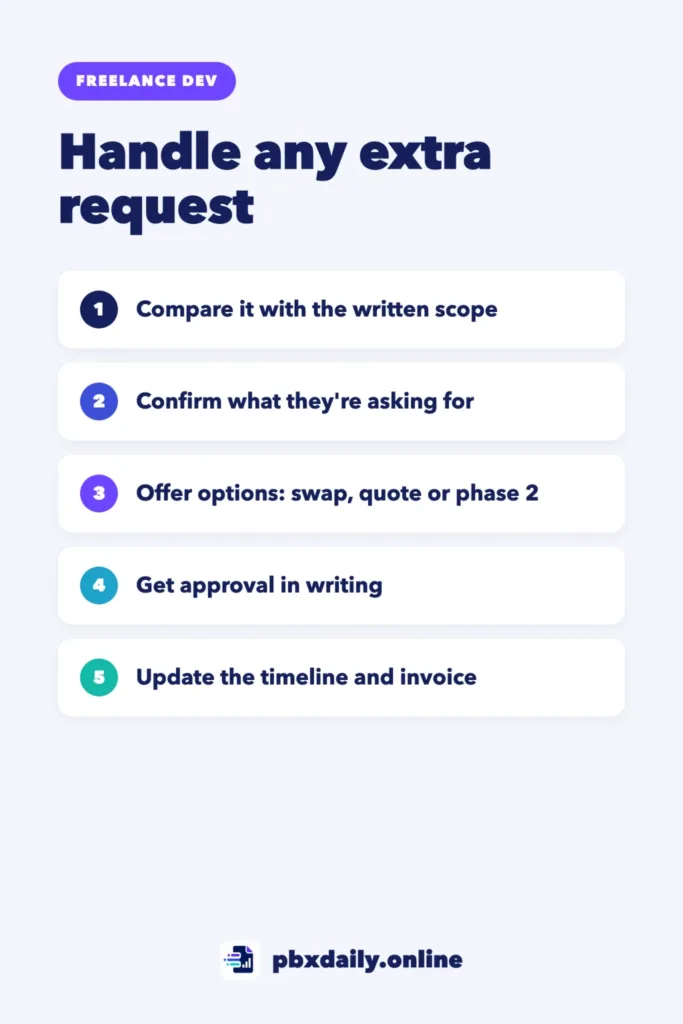
How to Handle Scope Creep in 4 Steps
Use the same four steps for every extra request, big or small.
1. Check the Written Scope
Before you reply, open your proposal or contract and find the relevant part. Is this request covered, partly covered or new? If you don’t have anything in writing, that’s the first thing to fix, even mid-project.
2. Acknowledge the Request
Reply quickly and positively. Thank them for the idea and confirm what they’re asking for in your own words. This shows you’re listening and avoids misunderstandings about what they actually want.
3. Offer Options
Instead of yes or no, give choices. Usually there are three:
- Swap: replace something already in the scope with the new request, at the same price.
- Quote: add it for an extra price and a new delivery date.
- Phase 2: finish the current project first and do the new work as a separate project later.
4. Get Approval in Writing
Don’t start the extra work until the client confirms the option, price and dates in writing. An email reply is enough for small changes. Then update your timeline and your next invoice.
Email Scripts for Common Situations
Adapt these to your own tone. Replace everything in brackets.
A small extra request:
Hi [name],

Good idea about [request]. It's not part of the current scope, but it's
a quick addition: about [time], for [price]. If you'd like it, reply
"approved" and I'll include it in the final delivery on [date].
A big extra request:
Hi [name],

Thanks for sharing the idea for [request]. It's a bigger piece of work
than what we planned, so I see two options:

1. Add it now: [price], and final delivery moves to [new date].
2. Finish the current site on [original date] and do [request] as a
   second phase right after.

Which works better for you?
“It’s just a small change”:
Hi [name],

I looked into it. It looks small on screen, but it means [what's
involved, in one sentence], which takes about [time]. I can add it for
[price], or we can swap it for [something in the scope] at no extra
cost. Let me know which you prefer.
An extra round of revisions:
Hi [name],

Thanks for the new feedback. We've used the [number] revision rounds
included in the project. I'm happy to do another round for [price].
To keep it efficient, please send all the changes in one list.
A client who thinks it was already included:
Hi [name],

I understand. Looking back at the proposal from [date], the scope
covers [what's included]. [Request] wasn't on that list, so it would
be an addition. Here are the options: [swap / quote / phase 2].
I'm happy to get on a quick call if that's easier.
How to Price Extra Work
Use the same method you used for the original price. Estimate the hours, multiply by your rate and add a buffer for testing and feedback. For repeated requests, consider a fixed price per item, such as a price per extra page or per extra revision round. Our guide on how to price your first freelance web project explains how to set your rate.
For anything bigger than a quick fix, send a short change order. It doesn’t need to be formal:
CHANGE ORDER #[number]
Project: [project name]
Date: [date]

Requested change: [description]
Extra price: [amount and currency]
New delivery date: [date]
Payment: [with the final invoice / before work starts]

Approved by: [client name], [date]
When It’s Fine to Say Yes for Free
Saying yes without charging isn’t always a mistake. It can make sense when:
- The change takes a few minutes and the relationship is good.
- The request fixes something you missed or misunderstood.
- It’s a long-term client and the goodwill is worth it.
If you do it for free, say so: “This one’s on me, since it’s quick.” That way the client knows it was extra and doesn’t expect the next one to be free too.
What to Do If the Client Won’t Pay for Extras
Sometimes the client insists the extra work was included, or simply refuses to pay more. Stay calm and go back to the documents:
- Point to the written scope. Quote the exact line from the proposal or contract, without blaming anyone.
- Repeat the options. A swap is often the easiest way out, because it costs the client nothing extra.
- Finish what you agreed. Deliver the original scope on time and well, so the disagreement stays about the extra, not about your work.
- Don’t do unpaid extras to avoid conflict. It teaches the client that pushing works, and the next request will be bigger.
If a client regularly argues about every change, that’s useful information for your next quote, or for whether to work with them again. Learning how to handle scope creep also means recognizing when a client isn’t a good fit.
How to Prevent Scope Creep on Your Next Project
- Ask detailed questions before you quote. Use our list of questions to ask a client before building a website.
- Write a “not included” line in your proposal. Our guide on how to write a freelance proposal shows where it goes.
- Define a revision round as one combined list of changes, and set how many are included.
- Add a change process to your contract so both sides know what happens when new ideas come up.
Scope Creep: Frequently Asked Questions
What is scope creep in freelancing?
Scope creep is when a project gradually grows beyond what was agreed, through extra features, pages or revision rounds, without a matching change in price or deadline. It usually happens through many small requests rather than one big one.
How do I say no without losing the client?
Don’t say a flat no. Offer options: swap it for something in the scope, add it for a price or do it later as a second phase. Clients usually appreciate the choice, and many will accept one of the options.
Should I charge for small changes?
Not always. A quick fix within the agreed work is part of a good service. Charge when the change adds something new, takes real time or goes beyond the agreed revision rounds. If you decide to do one for free, say clearly that it’s an exception.
Your Next Step
Copy the five scripts above into a document you can find quickly. Next time an extra request arrives, open your proposal, pick a script and reply the same day with clear options.

Luiz Loiola is a digital strategist and the founder of PBX Daily. He writes about technology, programming, artificial intelligence, freelancing, remote work, career change, and online income, helping beginners and professionals build practical digital skills, create new career opportunities, and compete in the global online market.